
Using the information below, this post will explain how to create a KLT camera file.
The first thing I do is to compute the fiducial coordinates. KLT fiducial coordinates are in milimeters.
- Multiply the sensor width by the sensor pixel size. In this example: 11608 * 4.6 microns = 53396.8 microns.
- Convert to mm by dividing by 1000. 53396.8 microns / 1000 = 53.3968mm
- Repeat for the sensor height. 8708 x 4.6 microns = 40056.8 / 1000 = 40.0568mm.
These values are the sensor size in mm. You can see the report above that the sensor width and height are shown correctly. I have seen reports where the sensor sizes in mm are rounded off so it’s just better to do the math from scratch.
In KLT, the 0,0 coord is in the center of the image, so we divide the above values in half. 53.3968 / 2 = 26.6984 for the width and 40.0568 / 2 = 20.0284 for the height.
I make the first fiducial coord the lower left corner of the image, which would be -26.6984, -20.0284. I have been informed by KLT personnel that they would prefer you define the camera in portrait mode. That is taller than it is wide. Doing this means we are rotating the image so we swap the width and height values: Use the following values:
- Fiducial number one (lower left): -20.0284, -26.6984
- Fiducial number two (upper left): -20.0284, 26.6984
- Fiducial number three (upper right): 20.0284, 26.6984
- Fiducial number four (lower right): 20.0284, -26.6984
I just enter the same dimensions into the camera extents fields.
What we have done here is to rotate the image 90 degrees. Because of that, the principle point will move, if it’s not 0,0. In this report, the principle point is in the +x+y (first) quadrant. Imagine that you rotated it 90 degrees clockwise. The PP would move to the +x-y (fourth) quadrant. The old positive x value would now be the new negative y value and the old positive y value would become the new positive x value. The new principle point would change from:
x=0.0389, y=0.0372 to
x=0.0372, y=-0.0389
Now for the camera distortion values. This is the distortion table values from the camera calibration report.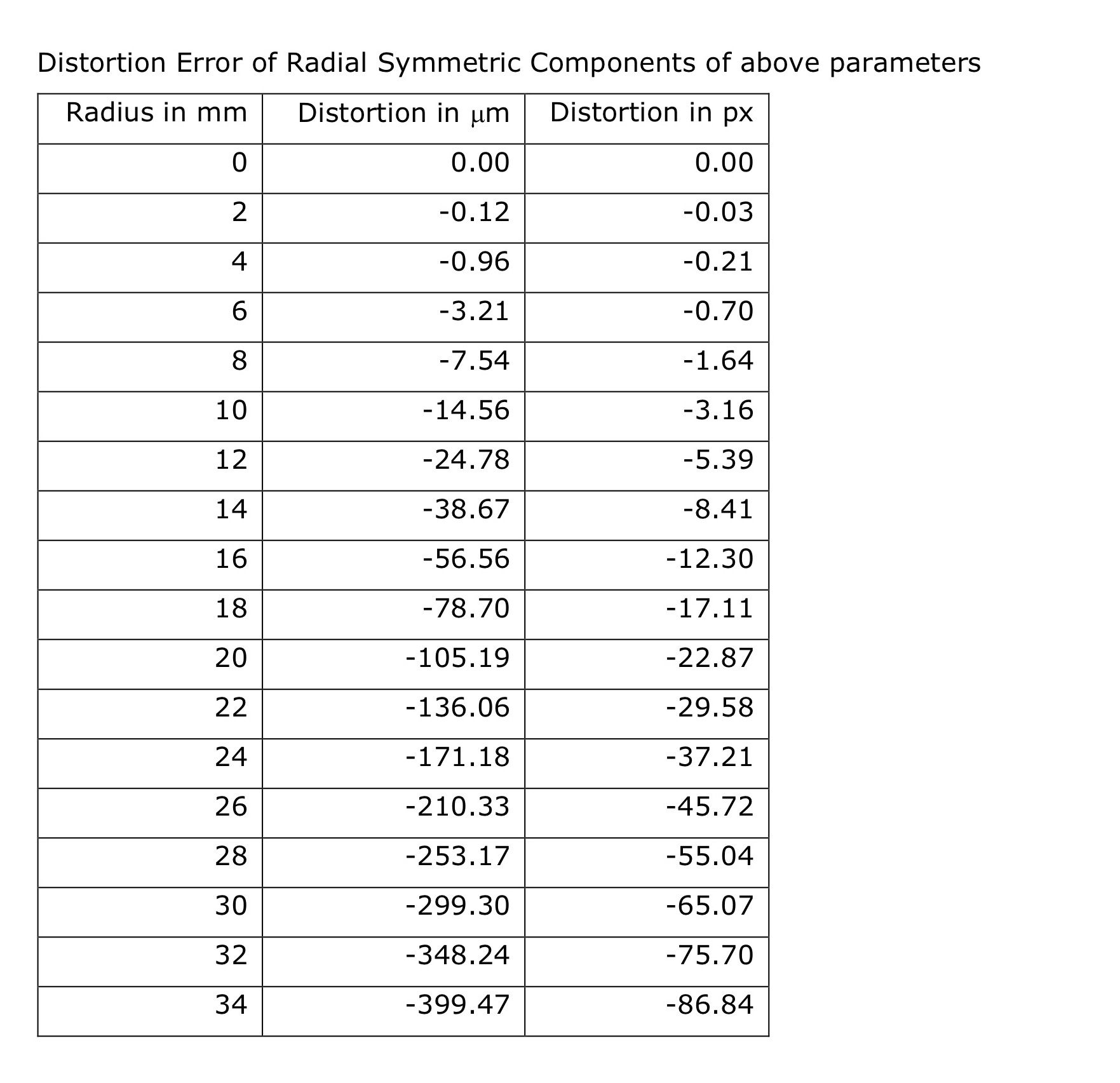
In the first exhibit above, the camera distortion coefficients are shown. That is great if you know what camera distortion model they used and KLT can accommodate it. Unfortunately, it has been my experience that for these smaller cameras , KLT does not have an option that works with the coefficients. Therefore, use the table values shown above. They can be entered into the camera program from the distortion tab. Select the table values and enter the above values.
I know I have left off a couple of things, like the camera type.
That’s all folks.